
We’re pleased to introduce a new feature in Elementary POS – QR code payments in Singapore! QR payments offer a fast and convenient way for you and your customers to make payments. As QR payments continue to gain popularity across Singapore, we’re glad to bring this option directly into our app. QR payment option is based on SGQR (PayNow).
As a business owner, you’ll especially appreciate the speed and efficiency of QR payments. They can also help reduce costs related to card processing fees and printed receipts. For customers, there’s no need to carry cash or cards, they can simply scan and pay using their mobile phone.
QR payments offer a secure and fast way to pay, making checkout easier for everyone.
How to Set It Up in Elementary POS
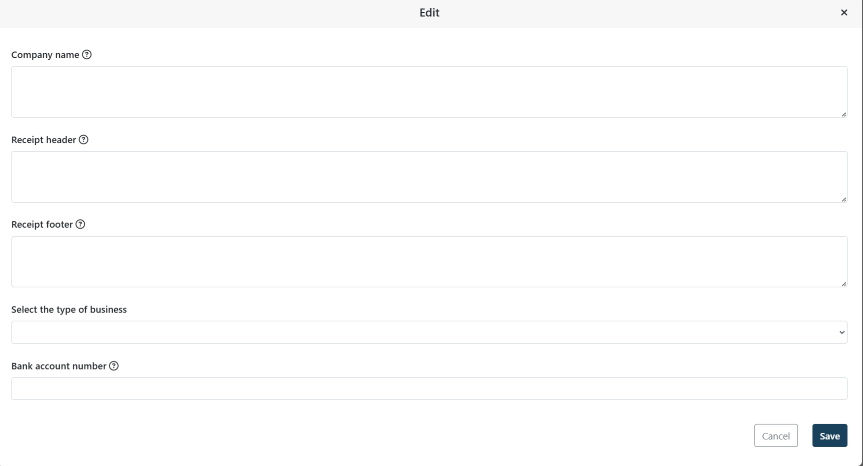
First, log in to your Elementary POS Back Office. From the menu, select Company Settings, then click Edit under Set Up Company Details.
On the next screen, enter your business name in the Company Name field. In the Bank Account field, enter your UEN (Unique Entity Number).
Then open the Elementary POS app and enable QR code payments during checkout. In the Settings – Payment method settings menu, you can choose which buttons will appear on the receipt. Set one of the buttons to the Bank option.
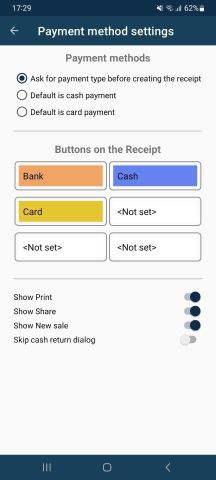
After this setup, you can immediately start accepting QR code payments in Singapore via the SGQR (PayNow) system.
Paying with QR Code
When a customer chooses to pay with QR code, simply tap the Bank button twice during checkout. The QR code will instantly appear on your screen, ready to be scanned with a mobile phone.
If you are using a Customer display, the QR code will be shown there as well, giving customers a clear and transparent view of the payment. This creates smoother checkout and better experience for both staff and customers.
We believe this update will make your everyday work with the app simpler and more pleasant. If your app hasn’t updated automatically, you can download the newest version for free on Google Play.